December 14, 2025
Set up tracking that works on busy days: fast, shared, insightful
Your tracking app should feel like a helpful assistant, not another chore. With a few simple lifehacks, you can integrate it seamlessly into your baby care routine so it works for you, even when you only have one hand free.
Trying to use every feature perfectly from day one can feel overwhelming and lead to "logging fatigue". A more effective approach is to optimize your workflow around your real-life needs, making the process fast, collaborative, and genuinely useful.
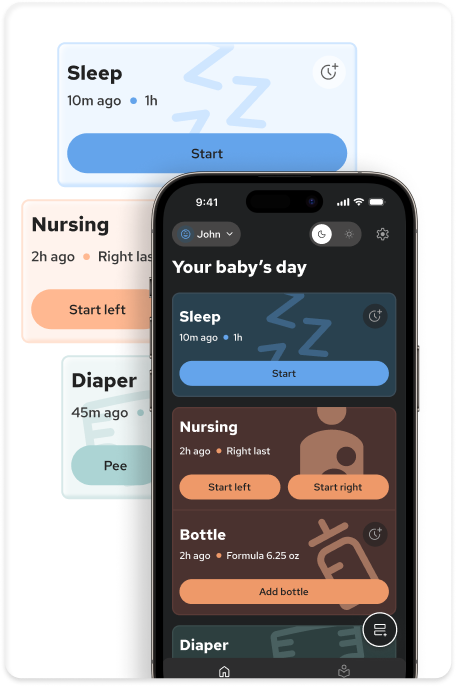
First, embrace the one-handed rule. Most of the time, you'll be logging while holding your baby. Set up your phone to make this easy. Place your app's icon on your home screen somewhere in the middle part of it for easy one-tap access to open and start a sleep or feeding timer. This allows you to capture the most time-sensitive information fast and easy.
Next, decide if you are a "log-as-you-go" or a "batch logger." Some parents find it easiest to log an event the moment it happens to avoid forgetting. Others find this disruptive and prefer to set aside two or three windows during the day to enter the last few hours of data from memory. Neither method is better than the other, just choose the one that feels less stressful for you.
Use the app as your silent communication tool with your partner. A quick, final log before you hand the baby over serves as a perfect "digital hand-off". It ensures your partner has all the immediate context they need, like when the last feeding was, without you having to say a word, which is especially useful during nighttime shifts.
Finally, use the app in "problem-solving mode". You don't need to track everything all the time. If your current focus is on understanding sleep patterns, use the sleep features intensively and feel free to ignore the others. Turn tracking into a temporary, focused investigation to get the insights you need, and then relax your logging once you have your answer.
Related Articles
December 17, 2025
What to track and why: finding your style
Tracking serves to free up mental space and spot patterns, but the "best" method is simply the one that fits your current energy level. You can fluidly switch between approaches for solving specific health concerns with your doctor.
December 17, 2025
Your data, your rules: privacy, exports, and control
Your data's privacy is paramount, so ensure your tracking app has a clear policy against selling personal information to third parties, keeping it accessible only to you and those you choose to share with. You should always retain full control of your data and be able to permanently delete your account and data whenever you wish.
December 14, 2025
From logs to clues: read patterns without overthinking
Staring at a screen full of data can sometimes feel more confusing than clarifying. Learn to use your logs to spot gentle clues so you can use data to validate your parental intuition, not replace it.
December 12, 2025
Make the app lighten your load: minimal logging, maximum calm
Your baby tracking app should be a source of confidence, not another demanding chore. We show you how to customize your approach for minimal effort, turning the app back into a tool for reassurance rather than anxiety.